Every change in one scroll
Unified or split, with syntax highlighting, changes within lines marked, and before-and-after previews of images.
Redline is a fast git review app. AI agents comment on the lines they're about and suggest fixes. You apply, reply or resolve, and send your answers back.
macOS 11 or later on Apple silicon · Windows 10 or later
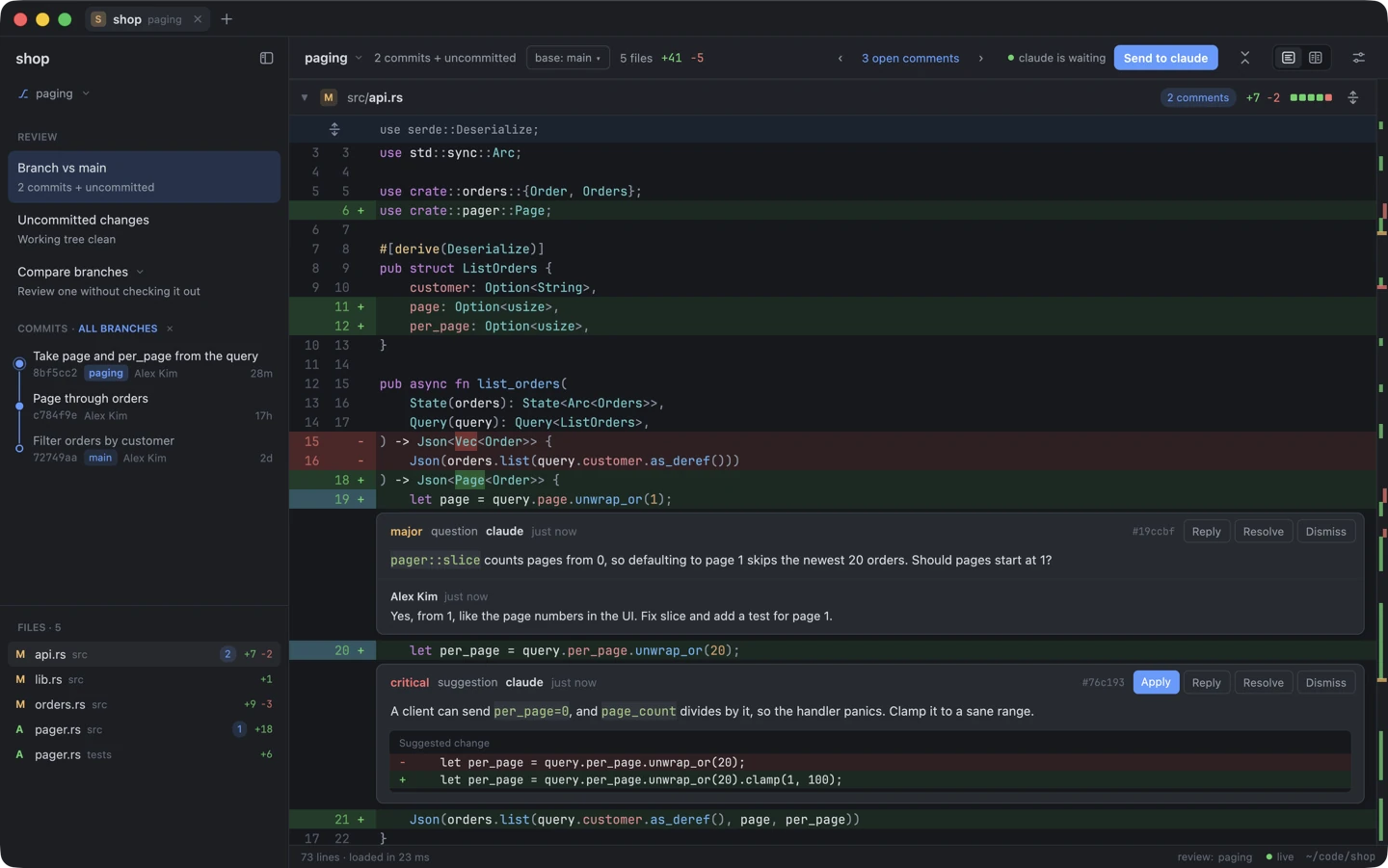
Your agent leaves its review where it belongs: on the lines it's about. You answer there too.
Tell your agent to “review my changes with redline”. It reads the diff with the redline command and comments on the lines it's about, with a severity and, when it can, a fix.
Comments appear as the agent writes them. Apply a suggested edit, reply, resolve or dismiss. Select any lines to add a comment of your own.
Press Send to agent. The agent gets your replies straight away, makes the changes, answers in the same threads, and waits for the next round.
Redline is built in Rust on a GPU-rendered UI, so even big branches scroll smoothly.
Unified or split, with syntax highlighting, changes within lines marked, and before-and-after previews of images.
A whole branch against its base, committed or not. A run of commits as one diff. Another branch, without checking it out.
Stage files, hunks or single lines in git's own index. Switch branches, open worktrees, and fetch, pull and push.
The redline command reads the diff with line numbers, writes comments and suggestions, and waits for your answers. Every read command has --json, and redline agents prints a guide written for agents.
redline diff
redline comment add --file src/pager.rs --line 13 --severity major \
    --body "One page too many when total is a multiple of per_page." \
    --suggest "    total.div_ceil(per_page)"
redline wait
Install the app, then teach your agent the redline command.
Open the .dmg and drag Redline to Applications. Then choose Redline › Install redline Command… to put redline on your PATH.
Or install it with Homebrew, from the davidcorbin/casks tap:
brew install davidcorbin/casks/redline
Run the installer. It installs for you only, with no admin prompt, and adds redline to your PATH.
The installer isn't code-signed yet, so Windows may say it protected your PC: choose More info › Run anyway.
Or get it from the Microsoft Store, which is signed and keeps Redline updated.
This installs the redline skill for the agents you have: Claude Code, Codex, Gemini CLI, Copilot, Cursor and others. For any other agent, redline setup --to <folder> installs it in its skills folder.
redline setup
Then ask it to “review my changes with redline”.
Yes. Redline is free to download and use, and MIT licensed.
Any agent that can run a command. redline setup installs the redline skill for the agents it finds, including Claude Code, Codex, Gemini CLI, GitHub Copilot, Cursor and OpenCode; for other agents, redline setup --to installs the same skill in the skills folder you name. The agent reads the diff, comments and waits for your answers with the redline command, and every read command has JSON output.
No. Redline has no accounts and no analytics, and your agent's comments are stored in your repository's .git folder. Apart from your git remotes, the only thing it connects to is its update feed, which you can turn off in Settings.
Redline runs your own git for everything, so your config, credentials, hooks, diff drivers and text converters work as they do in a terminal, and staging goes through git's own index. It never asks for passwords: sign in once from a terminal so your credential helper or ssh-agent has it.
Only when you ask it to: applying a suggestion edits that file, and staging, committing, switching branches and pulling are git operations you start. Comments live in .git/redline, never in your working tree. When an agent's sandbox makes .git read-only, as Codex's does, its comments go to a .redline folder that ignores itself, and the app moves them into .git.
Redline updates itself. A new version downloads in the background and the app asks you to restart. It never needs admin rights, because each install lives in a folder you own. Turn this off in Settings › Updates, or with REDLINE_NO_AUTO_UPDATE=1.

brew install davidcorbin/macOS 11 or later on Apple silicon · Windows 10 or later